
A from-scratch deployment guide for TLS termination, full-page caching and a private Magento origin on port 8080
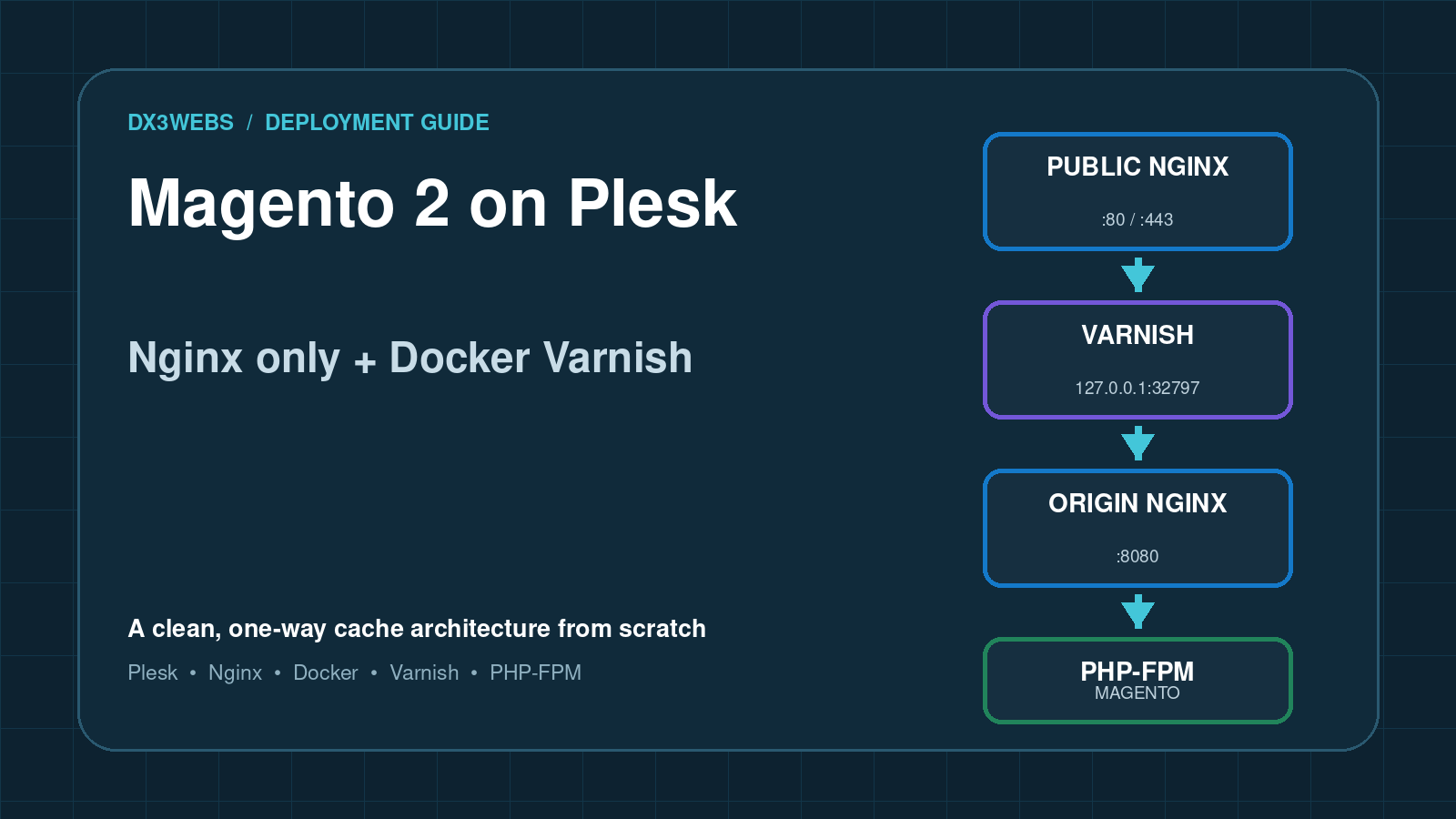
The finished architecture
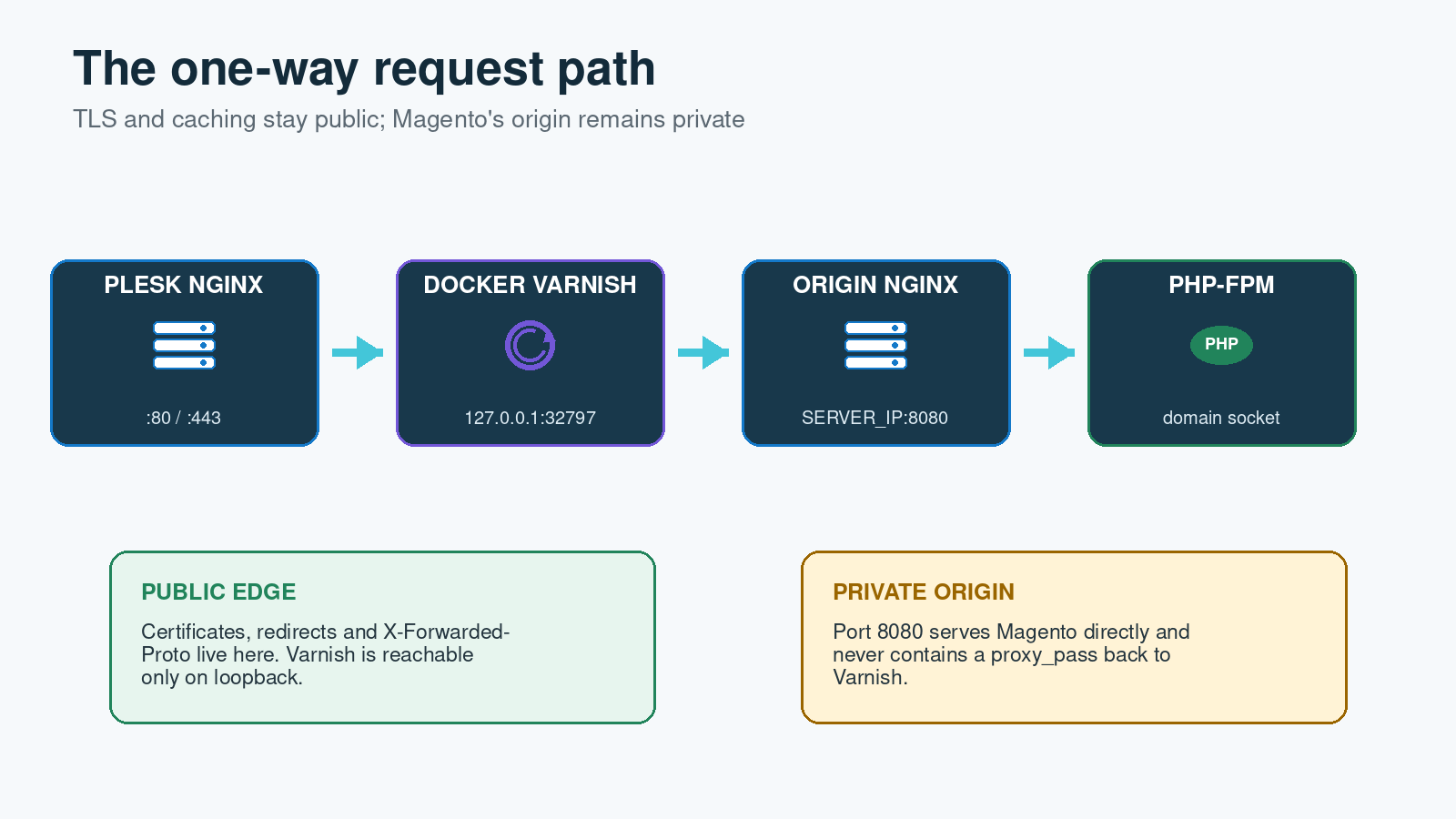
The public Plesk-managed Nginx service remains responsible for ports 80 and 443, certificates and HTTP/2 or HTTP/3. Storefront traffic is passed to a Varnish container on a loopback-only published port. Varnish then calls a separate Nginx origin listener on port 8080, and that listener executes Magento through the domain’s PHP-FPM socket.
The request path is intentionally one-way: public Nginx → Docker Varnish → backend Nginx → PHP-FPM. Apache is not involved, and the backend listener must never proxy back to the Varnish container.
Before making changes
Take a current snapshot or configuration backup and schedule a maintenance window. Confirm the Magento version’s supported PHP, Nginx, database, search and Varnish versions rather than treating the versions in this example as universal. Adobe currently lists Varnish 7.7 for recent Magento 2.4.8 patch releases, but older release lines differ.
Replace these placeholders throughout the templates:
DOMAIN— the primary hostname, withouthttps://SERVER_IP— an address reachable from the Docker bridgeMAGENTO_ROOT— the Magento installation directory, abovepubSITE_USER— the Plesk subscription system userPHP_VERSION— the selected Plesk PHP version32797— an unused loopback port published by this Varnish container
1. Put the Plesk domain into Nginx-only mode
In Plesk, select an FPM application served by Nginx for the domain. Then open Websites & Domains → DOMAIN → Apache & nginx Settings and disable Proxy mode. Plesk documents this as the switch that removes Apache from the website request path. Also disable Serve static files directly by nginx when it interferes with custom directives; Plesk has documented that combination preventing additional Nginx directives from taking effect.
Set the document root to Magento’s pub directory and confirm the uncached site works through PHP-FPM before introducing Varnish. Magento’s own Nginx sample contains application routing and security controls, so do not replace it with a generic try_files block that exposes private directories or permits arbitrary PHP execution.
2. Install the Magento routes in Plesk’s custom file
Store the domain-specific Magento locations in:
/var/www/vhosts/system/DOMAIN/conf/vhost_nginx.confThis is the custom file Plesk includes from its generated per-domain configuration. The same content can be managed through Additional nginx directives. The supplied template includes Magento’s static and media fallbacks, limits PHP to named entry points, denies sensitive media areas, protects both /static/ and /media/ with ^~, and gives /get.php an exact PHP-FPM handler with explicit HTTPS-offload parameters.
Magento’s standard static location must be adapted for Plesk’s Docker proxy rule. Use this exact block so Nginx removes the static-content version first, serves existing assets directly and passes only missing assets to static.php:
location ^~ /static/ {
    expires max;
    add_header Cache-Control "public";

    # Remove Magento's static-content version from the URL.
    rewrite ^/static/version\d+/(.*)$ /static/$1 last;

    # Fall back to Magento for assets not already present on disk.
    if (!-f $request_filename) {
        rewrite ^/static/(.*)$ /static.php?resource=$1 last;
    }
}
The connection from Varnish to the Magento origin uses HTTP even when the customer connected over HTTPS. Sending X-Forwarded-Proto through the proxy is necessary but, on this Plesk configuration, PHP-FPM also needs explicit FastCGI parameters so Magento does not mistake the origin request for an insecure connection and redirect repeatedly.
Add the parameters after include /etc/nginx/fastcgi.conf; to both PHP handlers:
location ~ ^/(index|static|errors/report|errors/404|errors/503|health_check)\.php$ {
    try_files $uri =404;

    fastcgi_read_timeout 1800;
    fastcgi_pass unix:/var/www/vhosts/system/DOMAIN/php-fpm.sock;

    include /etc/nginx/fastcgi.conf;

    fastcgi_param HTTPS on;
    fastcgi_param HTTP_X_FORWARDED_PROTO https;
    fastcgi_param HTTP_SSL_OFFLOADED https;
}

location = /get.php {
    try_files $uri =404;

    fastcgi_read_timeout 1800;
    fastcgi_pass unix:/var/www/vhosts/system/DOMAIN/php-fpm.sock;

    include /etc/nginx/fastcgi.conf;

    fastcgi_param HTTPS on;
    fastcgi_param HTTP_X_FORWARDED_PROTO https;
    fastcgi_param HTTP_SSL_OFFLOADED https;
}
This assumes the public storefront uses HTTPS and that any HTTP-to-HTTPS redirect happens at the public Plesk Nginx layer. Do not allow the private origin’s local HTTP scheme to decide whether Magento should redirect.
cp -a /var/www/vhosts/system/DOMAIN/conf/vhost_nginx.conf \
  /var/www/vhosts/system/DOMAIN/conf/vhost_nginx.conf.before-varnish

nginx -t && systemctl reload nginx
3. Manually create the backend Nginx listener
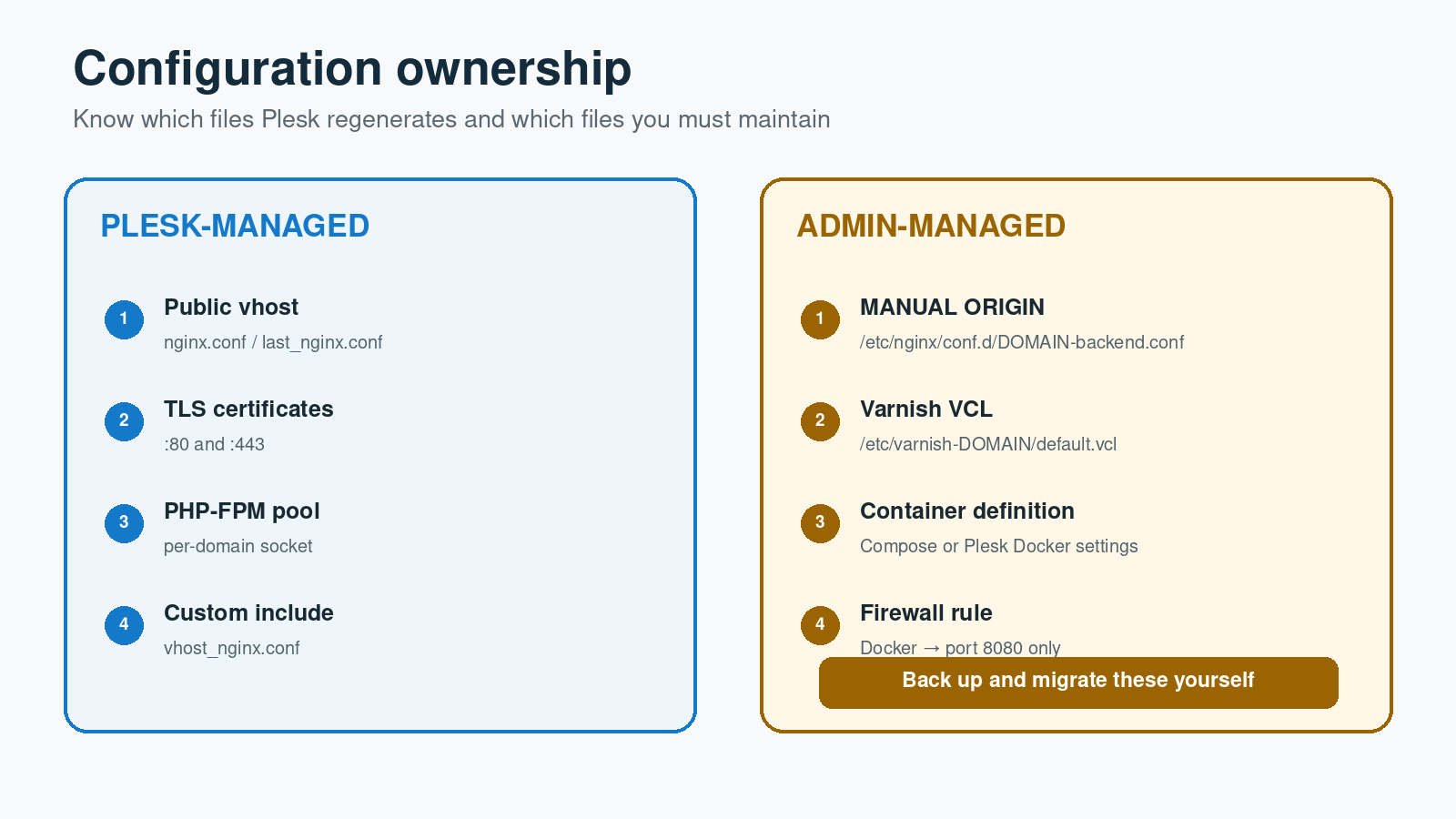
Manual step — do not skip: create /etc/nginx/conf.d/DOMAIN-backend.conf as root. Plesk does not create the port 8080 origin listener for this topology, and the GUI’s Docker Proxy Rule is not a substitute for it.
This file is administrator-managed rather than generated by Plesk, so ordinary domain reconfiguration should not overwrite it. That also means you own it: include it in server backups, configuration management and migration checklists.
The backend server block should listen on SERVER_IP:8080, use Magento’s pub directory, and include the domain’s vhost_nginx.conf. It must not contain Plesk’s #extension docker location or any proxy_pass back to the Varnish port.
server {
    listen SERVER_IP:8080;
    server_name DOMAIN www.DOMAIN;
    root MAGENTO_ROOT/pub;
    index index.php;

    include /var/www/vhosts/system/DOMAIN/conf/vhost_nginx.conf;
}
Test this origin before starting Varnish:
nginx -t && systemctl reload nginx

curl -I \
  -H 'Host: DOMAIN' \
  -H 'X-Forwarded-Proto: https' \
  http://SERVER_IP:8080/
The result should be Magento content—normally HTTP 200—and it must not contain a redirect back through the container. Restrict port 8080 to the Docker network in the host firewall; do not expose it as a public origin port.
4. Generate Magento’s VCL
Create a host directory for the container’s VCL, generate the VCL as the subscription user, and then install it into the protected host path. An explicit CLI memory limit avoids failures on stores whose Magento bootstrap exceeds the default Plesk CLI limit.
mkdir -p /etc/varnish-DOMAIN
cd MAGENTO_ROOT

sudo -u SITE_USER /opt/plesk/php/PHP_VERSION/bin/php \
  -d memory_limit=1G bin/magento varnish:vcl:generate \
  --export-version=6 \
  --output-file=/tmp/DOMAIN-default.vcl

install -o root -g root -m 0644 \
  /tmp/DOMAIN-default.vcl /etc/varnish-DOMAIN/default.vcl
Edit the generated backend so Varnish calls the manual Nginx listener:
backend default {
    .host = "SERVER_IP";
    .port = "8080";
    .first_byte_timeout = 600s;
}
If a generated health probe does not match the installed docroot or health endpoint, correct it before enabling the probe. A permanently sick backend will produce 503 responses even though TCP connectivity succeeds.
5. Start the Docker Varnish container
The older Dx3webs guide used the Plesk Docker extension: disable automatic port mapping, assign a unique host port, enable automatic restart, mount the VCL directory and set VARNISH_SIZE. Those principles remain valid. The supplied Compose example makes the same choices reproducible and binds Varnish to loopback so it is reached only through public Nginx.
services:
  varnish:
    image: varnish:7.7.0
    container_name: DOMAIN-varnish
    restart: unless-stopped
    ports:
      - "127.0.0.1:32797:80"
    environment:
      VARNISH_SIZE: 2G
    volumes:
      - /etc/varnish-DOMAIN/default.vcl:/etc/varnish/default.vcl:ro
    command: ["-p", "http_resp_hdr_len=32k", "-p", "http_resp_size=64k"]
The response-header limits are deliberate. Magento sites can emit very large Content Security Policy headers; in our earlier incident an 8,252-byte CSP header exceeded Varnish’s default 8 KB single-header limit and produced FetchError: http format error / RX_JUNK. Putting the parameters in the container definition makes them survive restarts and recreation.
docker compose up -d
docker exec DOMAIN-varnish varnishadm param.show http_resp_hdr_len
docker exec DOMAIN-varnish varnishadm param.show http_resp_size
docker exec DOMAIN-varnish varnishd -C -f /etc/varnish/default.vcl >/dev/null
6. Connect the public Plesk virtual host to Varnish
In Websites & Domains → DOMAIN → Docker Proxy Rules, add / and select the Varnish container and its published port. Plesk adds the proxy location to its generated public virtual host. Inspect the effective configuration and confirm it sends the original host, client address chain and protocol:
proxy_set_header Host              $host;
proxy_set_header X-Real-IP         $remote_addr;
proxy_set_header X-Forwarded-For   $proxy_add_x_forwarded_for;
proxy_set_header X-Forwarded-Proto $scheme;
X-Forwarded-Proto is essential because TLS ends at public Nginx and the next two hops use HTTP. Magento must still know that the browser used HTTPS. Forward the header through the proxy and set HTTPS, HTTP_X_FORWARDED_PROTO and HTTP_SSL_OFFLOADED in both PHP-FPM locations. Confirm Magento’s secure base URLs and offloader header before enabling a forced HTTPS redirect. A redirect at the public TLS layer is fine once this chain is correct; a redirect based only on the backend’s $scheme will loop.
nginx -T 2>&1 | grep -nE \
  'configuration file .*DOMAIN|proxy_pass http://127\.0\.0\.1:32797|X-Forwarded-Proto|listen .*8080'
7. Enable Varnish as Magento’s full-page cache
cd MAGENTO_ROOT

sudo -u SITE_USER /opt/plesk/php/PHP_VERSION/bin/php \
  -d memory_limit=1G bin/magento config:set \
  system/full_page_cache/caching_application 2

sudo -u SITE_USER /opt/plesk/php/PHP_VERSION/bin/php \
  -d memory_limit=1G bin/magento cache:clean full_page config
The equivalent Admin setting is Stores → Configuration → Advanced → System → Full Page Cache → Varnish Cache.
8. Validate every hop independently
Do not begin with a browser. Prove the origin, container and public endpoint separately:
# A. Backend Nginx: must return Magento without using Varnish
curl -sI -H 'Host: DOMAIN' -H 'X-Forwarded-Proto: https' \
  http://SERVER_IP:8080/

# B. Varnish published port
curl -sI -H 'Host: DOMAIN' -H 'X-Forwarded-Proto: https' \
  http://127.0.0.1:32797/

# C. Public TLS endpoint; run twice and look for HIT on the second request
curl -skI https://DOMAIN/ | \
  grep -iE '^HTTP|^x-cache:|^x-magento-cache-debug:|^age:'

# D. Confirm the container can reach the private origin
docker exec DOMAIN-varnish \
  bash -c 'timeout 5 bash -c "</dev/tcp/SERVER_IP/8080"'
Also test the homepage, category and product pages as a logged-out visitor, then checkout, customer login and the Admin. Purge operations should work, personalised responses must not be shared, and product image derivatives should be generated on demand without relying on catalog:images:resize.
Common failure modes
- Redirect loop:
X-Forwarded-Protois absent or replaced, the PHP-FPM handlers do not set the HTTPS-offload parameters, Magento secure base URLs disagree, or the backend redirects on its local HTTP scheme. - Varnish 503 with
RX_JUNK: a backend response header exceedshttp_resp_hdr_len, or the complete response head exceedshttp_resp_size. - All backends sick: the VCL health probe points at the wrong URI or cannot receive an acceptable response.
- Static CSS, JavaScript or font 404s:
/static/is not protected with^~, or Magento’s/static/versionNUMBER/prefix is not removed before checking the real file. - Product image 404s:
/media/is not protected with^~, or the internal/get.phpredirect is intercepted by the public Docker regex. - Origin recursion: the manual port 8080 server accidentally contains the Docker proxy location and sends Varnish back to itself.
- Works until a Plesk change: edits were made to generated
nginx.conforlast_nginx.confinstead of the supported custom file or/etc/nginx/conf.d.
What Plesk manages—and what you manage
Plesk owns the public domain virtual hosts, certificates, PHP-FPM pool/socket and generated includes. Your supported per-domain changes belong in vhost_nginx.conf or Additional nginx directives. The dedicated backend listener and Docker/Compose definition are manual server-level assets.
Do not edit Plesk’s generated /var/www/vhosts/system/DOMAIN/conf/nginx.conf or last_nginx.conf. Plesk may regenerate them. Conversely, Plesk should not overwrite /etc/nginx/conf.d/DOMAIN-backend.conf, but it will not maintain, migrate or validate the intent of that file for you.
Final deployment checklist
- Plesk Proxy mode is disabled and PHP-FPM is served by Nginx.
- Magento’s public root is
MAGENTO_ROOT/pub. vhost_nginx.confcontains^~ /static/, versioned-asset rewrites,^~ /media/and the exact/get.phphandler./etc/nginx/conf.d/DOMAIN-backend.confexists, listens on port 8080 and contains no Docker proxy.- Port 8080 is reachable from Docker but blocked from the public Internet.
- VCL points to
SERVER_IP:8080and validates successfully. - The Varnish container restarts automatically and retains its header-size parameters.
- The public proxy supplies
Host,X-Forwarded-ForandX-Forwarded-Proto. - Both Magento PHP handlers set
HTTPS on,HTTP_X_FORWARDED_PROTO httpsandHTTP_SSL_OFFLOADED https. - Magento uses Varnish for full-page cache and the second anonymous request reports a HIT.
- Login, basket, checkout, Admin, cache purge and on-demand product images have been tested.
Sources and further reading
- Dx3webs: Configure Varnish for Magento 2 on Plesk
- Plesk: Switch a domain to Nginx-only hosting
- Plesk: Apache and Nginx configuration files
- Plesk: Using Docker and Docker Proxy Rules
- Adobe Commerce: Install Nginx
- Adobe Commerce: Configure Nginx for Varnish
- Adobe Commerce: System requirements
- Magento 2 official nginx.conf.sample
- Varnish official Docker image